mesa
mesa writes recipes for your household, plans your week around it, and cooks alongside you in the kitchen.
Designed for everyone at your table.
Available on iPhone, iPad & Mac

Why mesa
From cookbook to kitchen counter — tuned to your household
- No shellfish, gluten freeGot it — and I'll cook for 4.Step 1
Tell mesa about your table
Who's eating, what they love, what they can't have, what's in your kitchen. mesa remembers all of it, so every recipe shows up ready for the people you're cooking for.
-
 Step 2
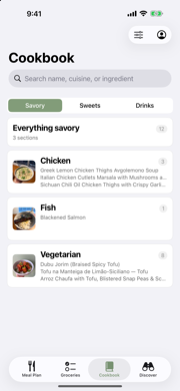
Build your cookbook
Ask mesa ai for fresh ideas, browse a hand-picked starter library, or bring in the index cards, photos, and printouts you've been collecting for years — kept exactly as you wrote them.
-
 Step 3
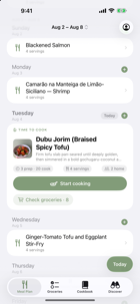
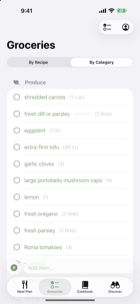
Plan your week, build the list
Drop recipes onto any day. mesa pulls every ingredient into one tidy grocery list, sorted by aisle so you're not zig-zagging the store.
-
 Step 4
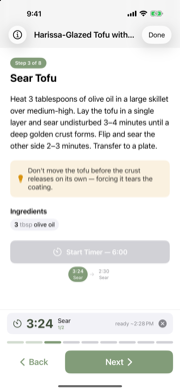
Cook the way you want
Big readable steps, timers that run together, and voice control for when your hands are full. Made for weeknight chaos and the occasional show-off Sunday dinner.


Quietly synced across every device at your table over iCloud — no accounts, no extra sign-ins.
Behind the magic
Every recipe, quietly tailored to your household
You ask. mesa applies what it already knows about your kitchen, your table, and your week — and a recipe arrives that just fits.
Hi Marcus — what should we cook?

Japanese vegetable and tofu stir-fry
Personalizing for your household
blending taste profiles into one recipe
Preferences
Preferences that belong to a person, not a household
Allergies, dislikes, the kid who's two, the air fryer on the counter — mesa already keeps all of it per person. That list now grows to health diets: low-FODMAP, lactose-free, low-oxalate, low-purine, low-residue, gluten-free.
- Allergies
- Dislikes
- Spice tolerance
- Kid ages
- Equipment
- Servings
- Health diets — new
-
A portion note instead of a wall. Chickpeas at a quarter cup are not chickpeas at two — and if the dish works with the pasta you buy anyway, mesa says so rather than hiding the recipe.
-
You set how strict. Gentle, standard, or strict — per diet, per person. mesa never moves the dial for you.
How strict, for low-FODMAP
Maya
Standard keeps the portion notes visible. Strict filters those recipes out instead.
Health diets help you find recipes. mesa doesn't give medical advice, and it won't tell you a dish is safe — check anything new against the plan you built with your care team.


Planning
The whole week, and the one night that's happening now
Every day sits in one list. Today's dinner rises out of it — the photo, the times, how many you're feeding, and the two things you'd actually tap next.
-
Start cooking, or check the eight things you still need. No hunting for either.
-
A meal can be for some of you. The kids eat at 5:30 and you eat at 7:30 — plan both, without duplicating the week.
-
Age-aware notes on kid plates. Choking-risk shapes, honey, raw sprouts — flagged with the age they apply to, sourced to AAP, USDA, and FDA guidance. Nothing hidden, nothing recommended.
One kitchen, every screen
On iPad, the week sits next to the cookbook
Same library, same plan, same list — laid out for the screen you're holding. Drag a recipe from the shelf straight onto Thursday, then flip the same panel to groceries.


Featured recipes
From the mesa kitchen
Hundreds of recipes written in-house, sorted into shelves that read like a person made them: pantry wins, just added, Tuesday-night triage.
